AstroBin is the home of astrophotography - Share full resolution images, preserve acquisition details, discover equipment, discuss techniques, and learn from the community.Discover AstroBin

Flats causing but blue patch in the middle

13 replies323 views
Craig Dixon avatar

Hi All,

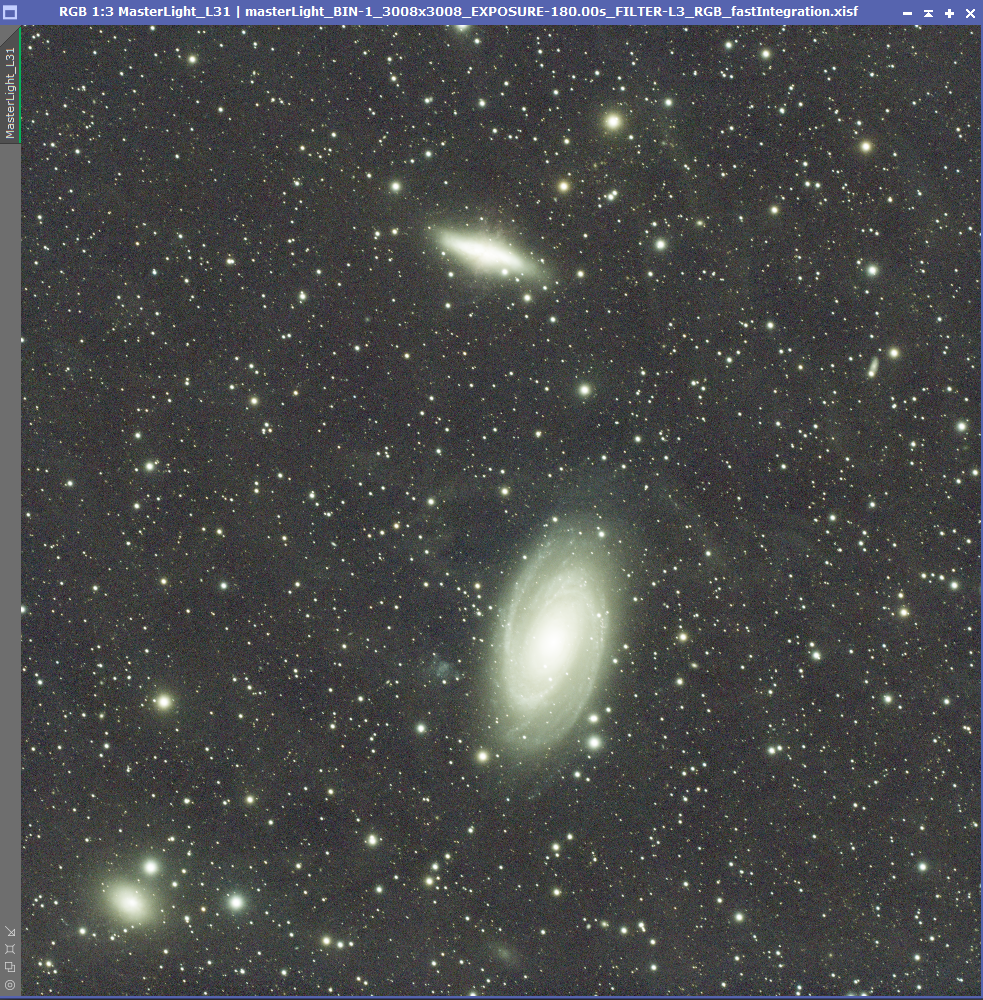
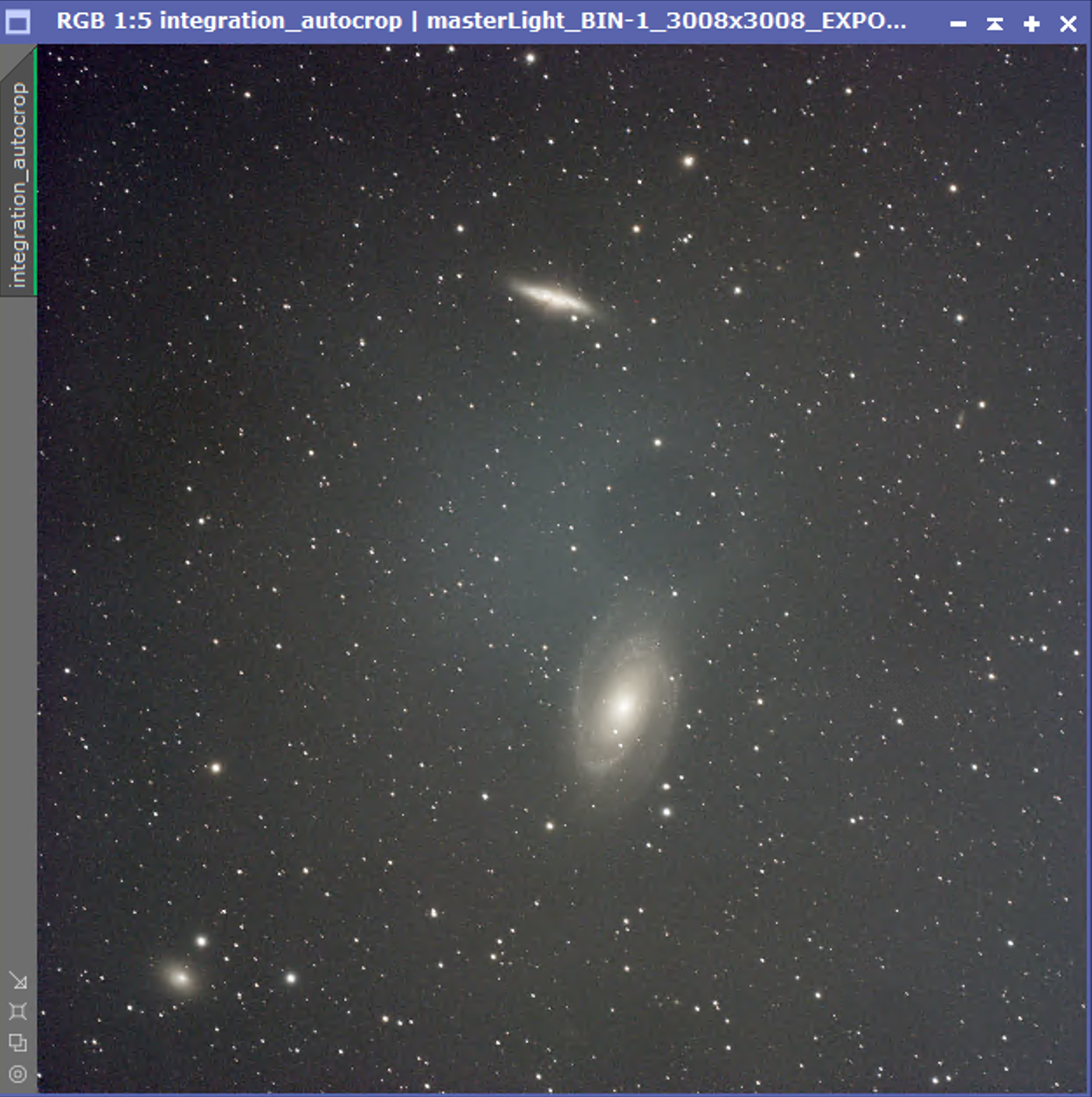
I’m getting an odd blue patch in the middle of my frame and I can’t for the life of me figure this out. Here’s a screenshot of the result from WBPP. I’ve also included in the screenshot the low and high rejection images. Im using flats and flat darks that I believe have all been done properly with matching temperatures, exposure times, etc. The light patch does show up in the flats but it’s just not calibrating out. I’ve reshot the lights, dark flats and even tried calibrating with bias frames but I can’t find a solution to this.

I’ve also added a screenshot showing the image after a bit of rough processing (over saturation to show the effect). I tried using various gradient removal tools but just can’t get rid of it. This is over 50 hours of data so I really don’t want to loose it.

ASI533MC Pro, ZWO FF65, Astronomik L3 filter.

Here’s a link to the master files and logs:

https://drive.google.com/drive/folders/1pf0Q3ghhq-fFQFM4pic8gNUv4-zMeleM?usp=sharing

Any help would be very much appreciated.

📷 Screenshot-2026-07-15-at-19.12.22.pngScreenshot-2026-07-15-at-19.12.22.png📷 Screenshot-2026-07-15-at-19.13.08.pngScreenshot-2026-07-15-at-19.13.08.png
Well written Respectful Concise Engaging
andrea tasselli avatar

You need to supply the raw files, not the calibrated stack.

Correctable it is:

📷 image.pngimage.png

Craig Dixon avatar

Happy to upload the full data set if you’d like, I just didn’t want to assume anybody would have the time or inclination to look that deep into it. It’s a lot of data though, over. 50 hours or 180 sec subs. How did you correct it please?

andrea tasselli avatar

Not the whole set, just a meaningful set, say 1 hours worth of data with the ancillary dark/bias/flat.

As for the correction the following has been applied:

  1. cropping out the borders

  2. ABE (linear only)

  3. MSGC

  4. Graxpert (process, not script), 2x

Craig Dixon avatar

Thanks, I appreciate you taking the time. here’s one night or lights as well as calibration files. I’ve re-done the flats and dark flats many times using different capture methods but get the same result.

https://drive.google.com/drive/folders/1PbdhzaDQ2jpOoBUqdZGpHO0j5l7fKFOG?usp=sharing

andrea tasselli avatar

Craig Dixon · Jul 23, 2026, 07:08 PM

Thanks, I appreciate you taking the time. here’s one night or lights as well as calibration files. I’ve re-done the flats and dark flats many times using different capture methods but get the same result.

https://drive.google.com/drive/folders/1PbdhzaDQ2jpOoBUqdZGpHO0j5l7fKFOG?usp=sharing

I gave it a go and my take is that you got something wrong going on in either the filter or in the refractor, flats shouldn’t look like that. Also, you are slightly out of focus. Can you try out some other filter to see if the problem persists?

📷 image.pngimage.png

Helpful Concise Engaging Supportive
Stellar Nomads avatar

was there dew on the scope? during imaging or flat taking? In my experience, that’s what would cause the center to bright up.

Helpful Concise Engaging Supportive
Craig Dixon avatar

andrea tasselli · Jul 23, 2026 at 11:45 PM

Craig Dixon · Jul 23, 2026, 07:08 PM

Thanks, I appreciate you taking the time. here’s one night or lights as well as calibration files. I’ve re-done the flats and dark flats many times using different capture methods but get the same result.

https://drive.google.com/drive/folders/1PbdhzaDQ2jpOoBUqdZGpHO0j5l7fKFOG?usp=sharing

I gave it a go and my take is that you got something wrong going on in either the filter or in the refractor, flats shouldn’t look like that. Also, you are slightly out of focus. Can you try out some other filter to see if the problem persists?

📷 image.pngimage.png

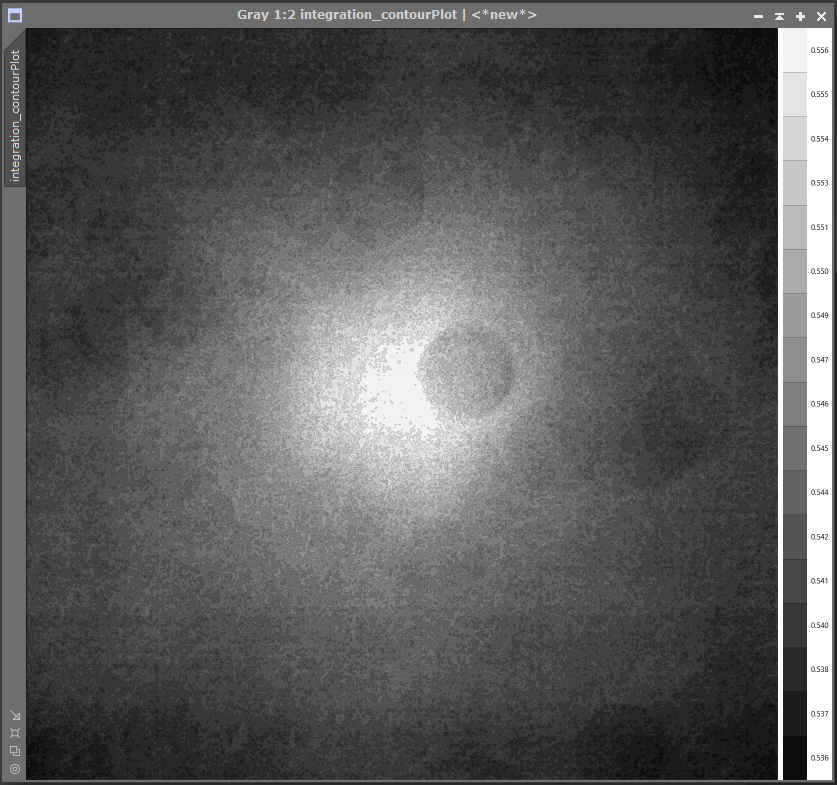
I agree, the flats look terrible but this bright patch is present in the light frames too. Here’s a screenshot of the master light from WBPP without using flats.

📷 Screenshot 2026-07-24 at 09.30.50.pngScreenshot 2026-07-24 at 09.30.50.pngI’ve taken some flats with no filter and am stacking the data now but they look very similar. Interestingly though, I also have some data with a DNB filter and these calibrated perfectly.

this is the first project I’ve started with the scope in this configuration (It usually has a mono camera and different filters/wheel on). I haven’t yet taken the system to bits to investigate as if I do so, I can’t then re-do any flats.

Stellar Nomads · Jul 24, 2026 at 12:51 AM

was there dew on the scope? during imaging or flat taking? In my experience, that’s what would cause the center to bright up.

I’m certain there was no dew either when taking flats or lights.

Helpful
andrea tasselli avatar

I don’t think the issue is with the flat. It could be the filter but it’s a bit extreme. Doesn’t look like a reflection either. But the bottom line is that the image can be salvaged so all is not lost. It would be nice to see if a more restrictive L filter (like L1) would solve the issue. A cheap SVBony UVIR cut should do, I think.

Well written Concise Engaging Supportive
Craig Dixon avatar

andrea tasselli · Jul 24, 2026 at 10:29 AM

I don’t think the issue is with the flat. It could be the filter but it’s a bit extreme. Doesn’t look like a reflection either. But the bottom line is that the image can be salvaged so all is not lost. It would be nice to see if a more restrictive L filter (like L1) would solve the issue. A cheap SVBony UVIR cut should do, I think.

I get what you’re saying. Here’s a screenshot of a single flat with no filter so the light patch is pretty much gone. I originally bought the Astronomic L3 as I had a SW 72ED (Doublet) at the time and was advised that the L3 would take care of some of the chromatic aberration produced by a doublet. The FF65 I’m using now is a quintuplet so the L3 is most likely overkill. I have a ZWO UV/IR that I could put in to try for the next time out but I’d still have thought that if I shot the lights and the flats through the L3 filter, the flats should still calibrate out the light patch.

I think you’re right though, the L3 filter, whether it’s unsuitable for this scope or it has something on it, is causing the issue. I think it’s time to break down the system and inspect as no amount of re-shooting flats is going to help now.

Well written Helpful Respectful Concise Engaging
Stellar Nomads avatar

Craig Dixon · Jul 24, 2026, 09:10 AM

andrea tasselli · Jul 23, 2026 at 11:45 PM

Craig Dixon · Jul 23, 2026, 07:08 PM

Thanks, I appreciate you taking the time. here’s one night or lights as well as calibration files. I’ve re-done the flats and dark flats many times using different capture methods but get the same result.

https://drive.google.com/drive/folders/1PbdhzaDQ2jpOoBUqdZGpHO0j5l7fKFOG?usp=sharing

I gave it a go and my take is that you got something wrong going on in either the filter or in the refractor, flats shouldn’t look like that. Also, you are slightly out of focus. Can you try out some other filter to see if the problem persists?

📷 image.pngimage.png

I agree, the flats look terrible but this bright patch is present in the light frames too. Here’s a screenshot of the master light from WBPP without using flats.

📷 Screenshot 2026-07-24 at 09.30.50.pngScreenshot 2026-07-24 at 09.30.50.pngI’ve taken some flats with no filter and am stacking the data now but they look very similar. Interestingly though, I also have some data with a DNB filter and these calibrated perfectly.

this is the first project I’ve started with the scope in this configuration (It usually has a mono camera and different filters/wheel on). I haven’t yet taken the system to bits to investigate as if I do so, I can’t then re-do any flats.

Stellar Nomads · Jul 24, 2026 at 12:51 AM

was there dew on the scope? during imaging or flat taking? In my experience, that’s what would cause the center to bright up.

I’m certain there was no dew either when taking flats or lights.

This can also happen on the camera windows itself. The objective here is to share all possible causes for educational purposes. It may help someone else.

Full disclosure: this happen on my SBIG 4040 in Chile, of all places, where the window produce a round spot obstruction in the flats and over corrected the lights. Turns out, it was an “error between the chair and the keyboard!”. Namely, I cooled the camera too quickly.

Helpful Engaging Supportive
Michael Smithers avatar

I have had a similar experience with the 533mc except my spot was red, I also couldn’t figure out what was going on, I changed my uvir cut filter from the filter draw and put it in the redcat’s filter holder so it was further away from the sensor and wrapped a black sock around the imaging train. This solved my problem but not sure if it was the filter (it was 5mm too close to the sensor due to bound up threads) or if it was light leaks. Hope you get it sorted as I know how frustrating it is.

Well written Helpful Respectful Concise Engaging Supportive
JTSAN avatar

I had the exact issue with an image. I forgot to enable drizzling when I stacked the subs. I re-stacked setting the drizzle to 2 (based on the scope I was using) and the blue went away. I had another image with a red blur on it and re-stacked the subs also with drizzle and the red also went away. I’m not sure it is your problem nor whether you even need drizzle integration.

Well written Helpful Respectful Concise Engaging Supportive
Craig Dixon avatar

Thanks to all who offered help with this. In the end, I just couldn’t calibrate this out so I had to just work with it as best as I could. here’s the final result, which i’m very pleased with considering the problems I had to overcome.

https://app.astrobin.com/u/craigdixon1986?i=biermt#gallery

Respectful Supportive