Between the flagged subs and the extra time spent removing trails in post, satellite traffic (Starlink-heavy skies) is becoming a real tax on imaging time for a lot of us. I’m messing around with a small tool that, given a target, site and time window, shows which parts of the night have the least satellite crossing your frame. So you plan around it instead of losing subs to it.
Curious what people here actually do about this today, anything beyond just rejecting bad frames in stacking? And would a dedicated “quiet window” planner be something you’d actually use, or is it not worth a separate step in your workflow?
Satellite trails ruining subs : worth a planning tool?

Well written Respectful Concise Engaging

I dont have any problem with satellite trails as these are removed cleanly during stacking using an appropriate pixel rejection method - usually Winsorized Sigma Clipping. I never throw away a sub just because of satellite trails and if one shows up in the final stacked image, some tweaking of pixel rejection parameters will sort that.
I’d have no use for such a “quiet window” planner.
Helpful Concise

Napkin_dev · Aug 18, 2026, 11:17 AM
satellite traffic (Starlink-heavy skies) is becoming a real tax on imaging time for a lot of us.
I simply cannot agree with this at all. Ive only had one image in the past 2 years that satellites posed an issue, and that was simply because I ran 20 minute subs which hurt my rejection on a shorter project. My own fault really.
Don’t think I’ve thrown away a single sub for a satellite, ever.
Take more shorter subs so you still end up with the same total exposure time, and stacking will handle them.
Helpful Concise

I also really haven’t found it to be a problem, so far proper stacking does the job so there has been zero impact for me. I really think this is a solution in search of a problem, at least for now.
Which stacking software? Like others here I’ve never had an issue with trails when stacked. I’m guessing 6-10 subs with trails per night

It depends on a lot of things but mostly exposure time and number of subs. Rejection will not always get them all if you only have maybe only 30 or so long exposure subs. Rejection will often not get them all with that few frames. This is not all that uncommon of you are very picky about FWHM for high res and you are doing narrowband.
In that case, I simply clone them out of whatever sub they might be in and that deals with the issue.
Avoiding them is not a great idea, IMHO.
I do wish there was a good AI routine to remove them from subs. It should be a perfect case for AI. The one I tried (I think it was in SETI) just does not work very well at all compared to clone tool.
Helpful
Yes, the Seti Astro tool is the only one that I know of that works on the sub-frame level.

Hello @Napkin_dev — If you use WBPP in Pixinsight, do the following:
Under the Lights tab, go to Image Integration
Keep the Rejection Algorithm on “Auto” — WBPP will choose
“Winsorized Sigma Clipping” if optimal.Change the Sigma High to 1.90 !!
These setting will obviate just about every (including Geosynchronous) satellite trail.
Of course, you still 🫨🫨 might want to exclude visually egregious trails ….
Jay
Helpful

How can this legitimately be considered a problem in 2026? I’ve never had a satellite trail cause me to discard a frame.
Well written

Joshua Akonom · Aug 19, 2026, 12:59 AM
How can this legitimately be considered a problem in 2026? I’ve never had a satellite trail cause me to discard a frame.
Not that I disagree, but I used sigma clipping 25 years ago and it rejected them just fine. Of course, then having a satellite streak was far, far more rare.
So 2026 is a bit more of a challenge than then if anything, but the rejection continues to take care of it.

I’ve been running an astro rig on and off for nearly 20 years now, and even in the early mid 2000’s, all decent stacking software included a sigma clipping algorithim (be it winsorized sigma clipping, or kappa-sigma clipping etc.) which would remove satellite trails quite easily providing that you followed a few basic rules…
‘Back in my day’, using CCD’s, and routinely running 10~30 minute subs, You either had to manually address satellite trails, or shoot a LOT of data to have stacking reject it all nicely… In the past 10 years with the massive shift into cooled CMOS cameras, I’m rarely running a sub longer than 5 minutes, never longer than 10, and for LRGB data, regularly 60~120s…. I’m potentially collecting 30 subs to every 1 sub I would have run with the CCD, with this, comes the ability to not only gain drastically by using dither and drizzle far more effectively, but I also get to simply ignore satellites entirely…
I will only delete a sub under the following conditions:
1 - It fails my culling parameters based on sky background, star count, fwhm or eccentricity.
2 - A plane flys directly through the frame leaving blinking nav lights, nose lights, under fuselage lights etc.
Satellites (even multiple in one sub) are meaningless… If this is really the top of your ‘Astro imaging problem list’, you sir, are blessed.
Well written Helpful Insightful Engaging

The WeightedBatchPreprocessing script in Pixinsight will automatically take care of the satellite trails in all but the extreme cases by selecting the correct pixel rejection algorithm for you, as stated in many of the earlier posts.
In cases where you may need to tweak things manually, the tooltip (hold the mouse pointer over the “rejection algorithm” drop down menu inside rejection section) of the ImageIntegration process has a thorough description of the available algorithmic choices for different scenarios.
Here is a concrete example where I needed a manual tweak:
The comet C/2026 R3, visible this spring, had only a very short time window available for imaging before it was drowned by sunlight. I was only able to collect 8 frames, 60 seconds each with the luminance filter, and the raw stack without any rejection was peppered with Starlink and other satellite trails even though the stack only represented 8 minutes of exposure in total.
The rejection algo named Generalized Extreme Studentized Deviate is a great choice for small stacks, and solved this nicely after playing a bit with the ESD outlier setting, as can be seen in the screenshot below where the final image does not even show a hint of satellite trails.
📷 image.png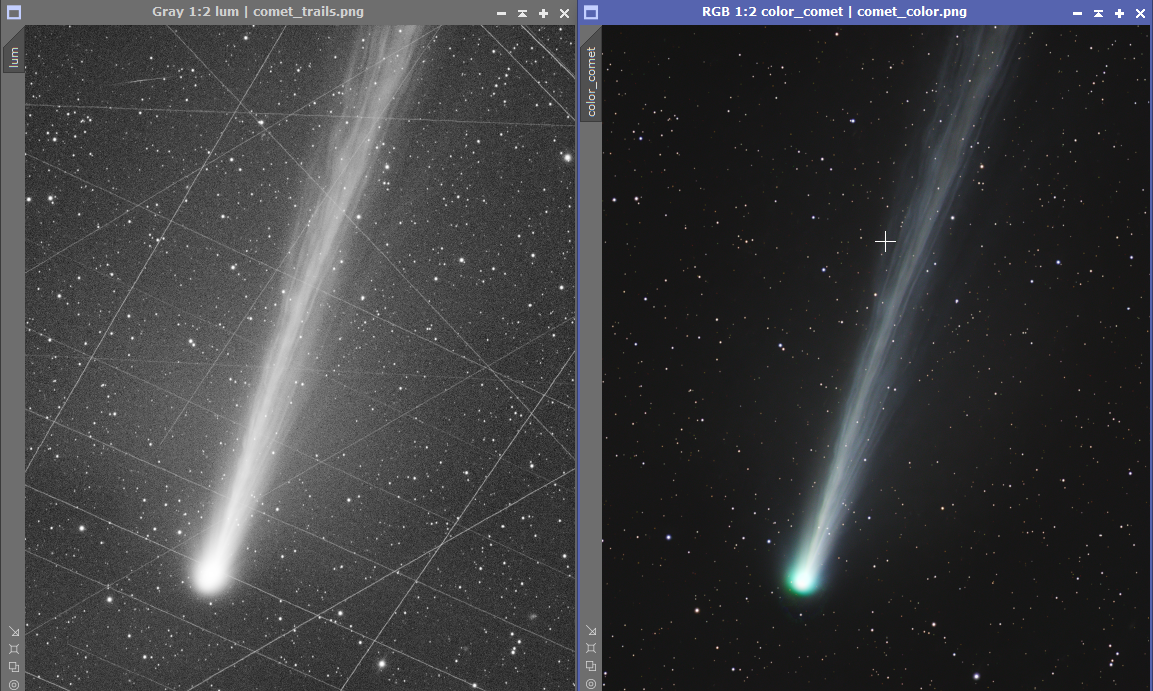
Well written Helpful Respectful Engaging

No problems with removing satellite trails - if you know how to use PixInsight´s stacking system or SetiAstro´s satellite removal tool.
If you know your stacking program, you can cope with very many satellite trails - and a very simple solution - take more subs. A trail needs about 10-12 clean subs to be fully removed, so what is the problem?
I do take usually between 200-500 subs per color, so all trails are gone.
And planes - well they are unremovable, but unless you have your rig on an airport, you won´t run into many of them during a night..
CS
Georg
Well written Helpful Concise Engaging Supportive

“Almost” no problem with satellites. For 99% of the cases, I just enable rejection during stacking, and can easily achieve satellite-free stacks.
The only exception is when I image around the satellite highway (Orion, basically) where tracks of the geostationary satellites overlap with each other heavily. In such cases, rejection does not work very well. Since they are geostationary (high earth orbit), they are essentially under sunlight all the time (never become dark). So you just can’t pick a time and avoid them. They are always there.
So, they are either not causing problems at all or are unavoidable no matter what. This means I never worry about them.
Well written Helpful Insightful Respectful Engaging Supportive

Napkin_dev · Aug 18, 2026, 11:17 AM
Between the flagged subs and the extra time spent removing trails in post, satellite traffic (Starlink-heavy skies) is becoming a real tax on imaging time for a lot of us. I’m messing around with a small tool that, given a target, site and time window, shows which parts of the night have the least satellite crossing your frame. So you plan around it instead of losing subs to it.
Curious what people here actually do about this today, anything beyond just rejecting bad frames in stacking? And would a dedicated “quiet window” planner be something you’d actually use, or is it not worth a separate step in your workflow?
Satellites are only visible when they are in the sunlight, as soon as they go in the earth’s shadow they are gone.
The earth shadow zone can be obtained in for instance Stellarium. Just set the clock to a desired observation time, like 11PM and click somewhere on the sky, now read the left column of text and see what it says about the sunlit conditions. In Stellarium you can turn the atmosphere on and off with an A.
Early in the evening it will say for instance that the observer is in the dark and that the satellite is in the sunlight. Later in the evening it will say both the observer and the satellite are in the dark. This is where you want to be for the low earth satellites which is typically starlink like.
So observe a little later after sunset and stop earlier before sunrise and most of the satellite tracks are gone.
What you also can do is to avoid too long integration times, 180s is sort of optimal for me, but if you are really concerned about losing to many frames then step down to for instance 30s. The S50 even goes to 10s.
Finally, stacking removes a lot of the satellite tracks. With 180s integration time roughly 10% of my frames end up in nothing, the WBPP in PinInsight takes care of it and otherwise there is blink function in pixinslight where you can do it yourself.
Satellite trails are not my biggest concern, but the weather is, clouds in particular.
Everyone has his own tools and tricks, good luck
Helpful Supportive